



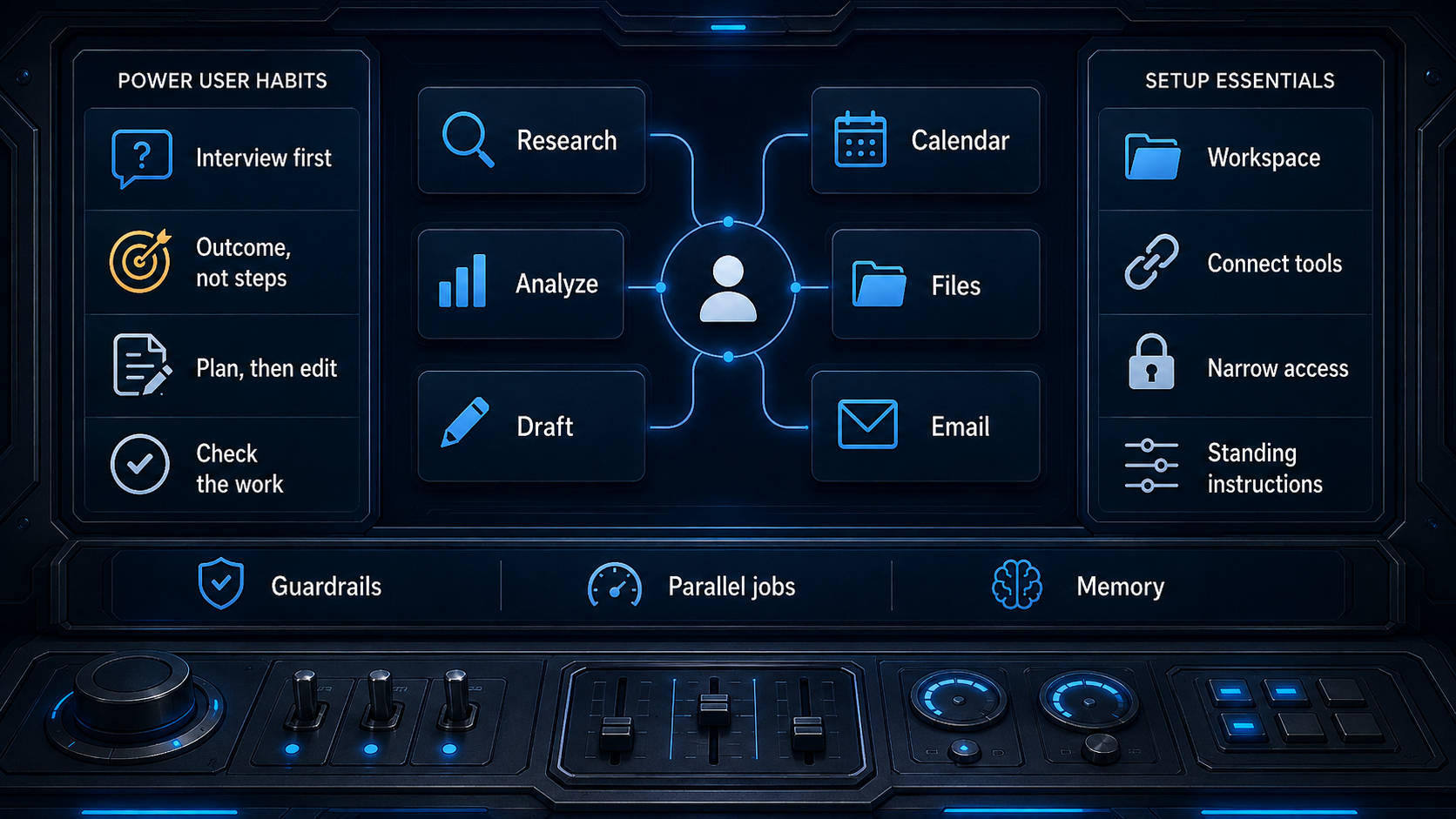
Becoming an AI power user isn’t really about memorizing a better prompt or finding a secret model setting. It’s about changing the way you work with these tools, one small habit at a time. The first set of habits can be adopted almost immediately, and each one takes less than a minute to put into practice. One of the most powerful is to let the AI interview you before it starts doing anything. Instead of giving it a one-line request, tell it to ask questions about constraints, edge cases, assumptions, and scope until it has what it needs. This feels a little strange at first, but it forces you to think through what you actually want, and it surfaces requirements you didn’t even know you were missing. The same logic applies to describing the outcome rather than the steps: say what should exist when you’re done, who will read it, and what it’s for, and let the AI figure out the “how.” That’s its job. Then, before letting it produce the whole deliverable, ask for a plan first and edit the plan. Fixing a plan costs you a paragraph; fixing a finished run costs you the entire task. You can also give the AI a way to grade itself by handing it a checklist that returns a simple pass or fail, so it keeps working until it actually meets your standards instead of stopping at the first version that looks done. If this all sounds like too much, there’s a meta-hack: ask Claude to help you deploy all of these at once. The common thread is that these changes happen while you’re working, not before or after, and that’s exactly why they improve the results so dramatically.
The next cluster of in-the-moment habits is just as practical, and together they teach you how to trust AI without being naive. Demand a citation for every claim, and then carefully check each one, because a fabricated citation looks exactly like a real one. If the AI can’t verify something, tell it to flag that gap instead of quietly filling it with a guess. Before you trust it on work you can’t check, test it on something you already know the answer to. That’s how you learn where it’s strong and where it’s bluffing. Ask for several options, and then make it argue against itself. One answer always reads as authoritative, whether or not it’s right; three answers and a critique of each give you something to actually judge. While the AI is running, pay attention and steer it the moment you see it misunderstood you, rather than waiting until the end to reject a finished product. Long jobs are worth running in parallel: start the ten-minute research task and go get coffee, or start a second job and alternate between the two, so the results end up waiting for you instead of you waiting for them. Finally, calibrate the effort to the task. For a quick lookup, a simple chat or even Google is the fastest path. Running the most powerful agent on a question that a search engine can settle burns time and credits you’ll want later. Power users don’t have better prompts; they have better workflows, and these hacks are the proof. They keep you engaged in the process, and that engagement is what separates people who merely use AI from people who get genuinely remarkable work out of it.
The second half of the journey is less glamorous but even more rewarding over time: it’s about your setup and your standing rules. Many people skip these habits because the payoff is delayed. You spend twenty minutes on a Tuesday configuring something, and the return shows up in slow increments over the following months. But those increments compound until they feel like a superpower. Give your AI a persistent workspace, where the files, standing instructions, and history for one body of work all live in one place. Connect it to the tools you already use—your calendar, your drive, your inbox—so it starts with your real material instead of whatever you remember to paste in. This takes ten minutes, and afterward it transforms the AI from a generic assistant into one that actually knows your world. At the same time, grant the narrowest access the job needs. This matters more than it sounds: a hostile instruction hidden in a web page or an email can be read as though you typed it, and the AI can only act through the tools you’ve already handed over. A research task with web access alone is a far smaller target than the same task with access to your files and your inbox. Put your standing preferences in settings, not in prompts. If you retype “be concise, no bullet points, write like a person” at the top of every request, you’re doing work the settings page will do once. And decide once what AI may never do on your behalf. Write down the two or three lines that matter—don’t send anything, don’t delete files—and put them in your standing instructions instead of trying to remember them prompt by prompt. Boundaries like these are actually liberating; once you know what the AI will never do, you can let it move quickly everywhere else.
The rest of the setup hacks are about making the AI feel less like a stranger and more like an extension of your own thinking. Turn on dictation and talk instead of typing. You speak about three times faster than you type, and because talking is cheap, you naturally ramble out all the background and caveats you’d never bother to type—and that context is often exactly what was missing the whole time. Turn anything you do repeatedly into a skill. Save the instructions for tasks you repeat, whether it’s a house style, a review checklist, or a report format, so you stop rebuilding it from memory every week. Schedule recurring work only after the prompt is proven. Get the output right by hand first, because a mediocre prompt on a schedule is a mediocre output every week forever. Set a personal rule around failed corrections: if something has failed twice, stop patching the thread and start a fresh session with a better opening prompt. A long, cluttered thread is full of false starts and confusion; a clean beginning is often faster. Finally, let AI remember you, but read what it remembers. Memory makes the tool useful faster, and a wrong memory quietly degrades every answer after it, so audit the stored list once a quarter and delete anything that’s inaccurate or no longer relevant. The beauty of these setup habits is that they’re one-time efforts that keep paying you back. They turn the AI into a colleague who already knows your style, your files, and your boundaries, instead of a stranger who needs a fresh briefing every time you open the chat.
There’s a deeper truth underneath all of these habits: the models keep getting better, and some of these hacks will become obsolete before long, but one thing will not change. AI generates more options than you can read. What it lacks is judgment. It can’t tell you which option is right, and that call is yours. The AI might be able to write a brilliant memo, but it doesn’t know what your organization values, which client is sensitive, or why a particular decision is political. It can suggest three ways to structure a launch, but only you know the one that won’t break a promise or hurt someone’s feelings. That’s why the hacks work: they’re not about letting the AI take over; they’re about making it a better thinking partner. They keep you in the loop at every stage—from interviewing you at the start to grading its own work at the end—precisely because the final judgment has to be human. Sometimes the best move is to skip AI entirely. You don’t need a machine to decide whether to say hello to a colleague or whether a sentence sounds too harsh. And you absolutely shouldn’t fall asleep and let AI take the steering wheel. The phrase to remember is “caveat promptor”: let the prompter beware. The AI may be fast, fluent, and confident, but you are still responsible for what it produces and what you do with it. That responsibility is not a burden; it’s the whole point. It’s what turns a clever tool into something genuinely useful.
If you want to go further, these lists are distilled from the guidance the AI labs publish themselves. The first two sources carry most of what’s above; the rest are worth a look if you want to go deeper on a particular habit. But you don’t need to master every one of them to start seeing a difference. Pick two or three that resonate with your work and try them tomorrow. Let the AI interview you on your next project, or write down one never-do rule, or turn on dictation and see what comes out. The goal isn’t to be the person with the fanciest setup; it’s to be the person who uses the tool with intention. Power users aren’t more gullible, and they aren’t more obsessed with technology. They’ve simply learned to treat AI as a talented intern who needs clear constraints, steady feedback, and a human supervisor who takes responsibility for the final call. That’s a skill we can all build, one small habit at a time. And the more you practice it, the more natural it becomes. Eventually, you’ll stop thinking about hacks altogether and just start working the way that makes sense: with AI as a collaborator, not a replacement; as a generator of options, not a decider; as a tool that amplifies your judgment rather than replacing it. That’s the real meta-hack, and it will still be true long after today’s features have changed.